API keys, the CLI, and MCP solve different problems. Choose the method that matches the program or person that needs Disbug data.
## Compare the three methods
| Method | Use it for | Authentication |
| --- | --- | --- |
| API key | Your own HTTP integration | Personal API key |
| CLI | Terminal work, scripts, and report watching | Revocable agent token in a local profile |
| MCP | Coding agents that call Disbug tools | The same profile and agent token as the CLI |
The CLI and MCP use one Disbug team for each profile. They do not use your personal API key.
## Use an API key for an HTTP integration
Create an API key when your application calls the Disbug API directly. The key uses the permissions of the user who created it.
Create and revoke keys in **Profile Settings > API Keys**. Store each key in a secret manager. Do not put it in source code or a coding-agent configuration.
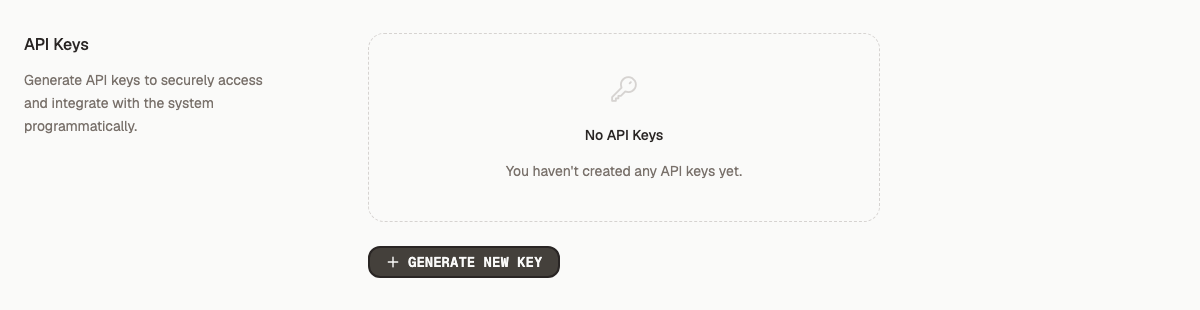
API-key availability depends on your plan. [Manage your account and API keys](/manage-your-team-account-and-connected-agents-0892584b#manage-your-account-and-api-keys) explains how to revoke a key.
## Use the CLI for terminal work and scripts
Install the CLI with Homebrew:
```bash
brew install disbug-io/tap/disbug
```
On Windows, use Scoop:
```powershell
scoop bucket add disbug https://github.com/disbug-io/scoop-bucket
scoop install disbug
```
Log in and examine the connection:
```bash
disbug login
disbug whoami
disbug doctor
```
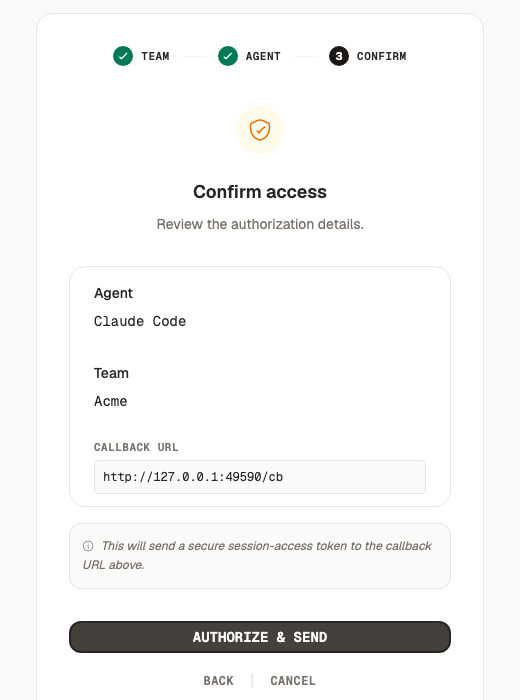
`disbug login` opens a browser page. Choose or create an agent for the CLI session, then confirm access. The page sends a token back to the CLI on your computer.
Use the CLI to list, search, and read reports. It can also download evidence, change status, and watch for new reports. See [Watch for new reports](/connect-a-coding-agent-and-watch-for-reports-87cb32a4#watch-for-new-reports).
## Use MCP for a coding agent
Run the MCP server through the CLI:
```bash
disbug mcp
```
MCP lets a compatible coding agent call Disbug operations as tools. The agent can search reports, request pin evidence, download attachments, and change status. [Connect a coding agent and watch for reports](/connect-a-coding-agent-and-watch-for-reports-87cb32a4) sets this up for you.
Use the CLI instead for shell scripts and `disbug watch`.
## Use profiles for different teams
The default profile is `default`. Put `--profile` before the command for another team.
```bash
disbug --profile work login
disbug --profile work whoami
disbug --profile work doctor
```
Make sure that the MCP configuration uses the same profile.
## Protect tokens
An API key represents your user. An agent token represents one connected agent in one team. Revoke either credential when it is lost or no longer necessary. See [Manage connected agents](/manage-your-team-account-and-connected-agents-0892584b#manage-connected-agents).
## Next step
- [Connect a coding agent and watch for reports](/connect-a-coding-agent-and-watch-for-reports-87cb32a4)
- [Manage your team, account, and connected agents](/manage-your-team-account-and-connected-agents-0892584b)
Choose between API keys, CLI, and MCP
API keys, the CLI, and MCP solve different problems. Choose the method that matches the program or person that needs Disbug data.
Create an API key when your application calls the Disbug API directly. The key uses the permissions of the user who created it.
Create and revoke keys in Profile Settings > API Keys. Store each key in a secret manager. Do not put it in source code or a coding-agent configuration.
disbug login opens a browser page. Choose or create an agent for the CLI session, then confirm access. The page sends a token back to the CLI on your computer.
The Confirm access step of disbug login
Use the CLI to list, search, and read reports. It can also download evidence, change status, and watch for new reports. See Watch for new reports.
MCP lets a compatible coding agent call Disbug operations as tools. The agent can search reports, request pin evidence, download attachments, and change status. Connect a coding agent and watch for reports sets this up for you.
Use the CLI instead for shell scripts and disbug watch.
An API key represents your user. An agent token represents one connected agent in one team. Revoke either credential when it is lost or no longer necessary. See Manage connected agents.

