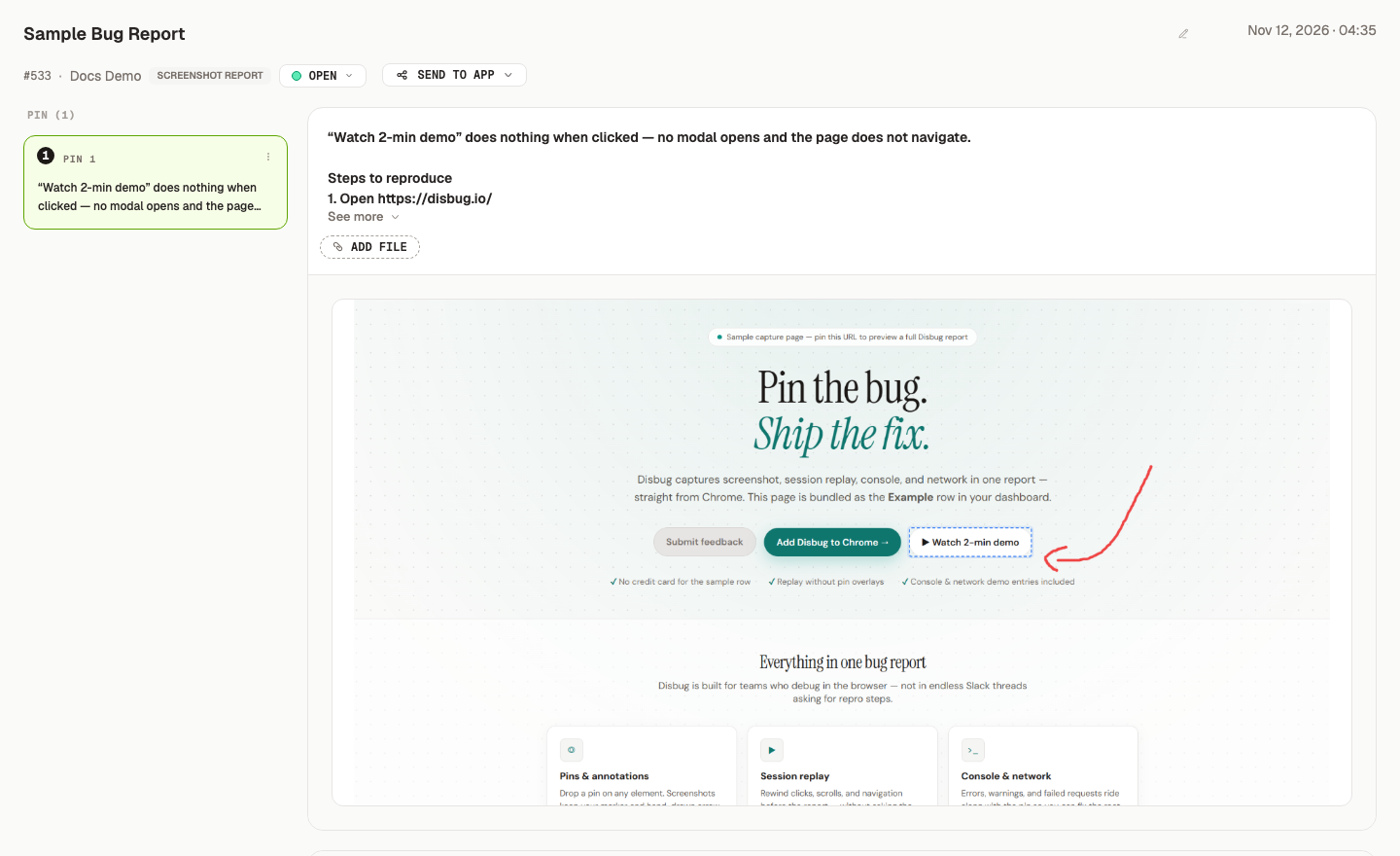
Disbug turns a browser bug into a report that a developer or a coding agent can act on. A report keeps pins on page elements, screenshots, console errors, network requests, replay data, and screen recordings in one place.
These docs are for people who report bugs, developers who fix them, team administrators, and developers who connect a coding agent to Disbug.
## Start here
Follow these three steps to go from install to your first report in a coding agent.
<Column>
<Cols>
<Card type="highlight" title="1. Install the extension" icon="puzzle" link="/docs/install-the-extension-and-report-your-first-bug-0e29db0c">
Add Disbug to Chrome and pin it to the toolbar.
</Card>
</Cols>
<Cols>
<Card type="highlight" title="2. Save your first report" icon="bug" link="/docs/install-the-extension-and-report-your-first-bug-0e29db0c">
Pin a page element, describe the problem, and save.
</Card>
</Cols>
<Cols>
<Card type="highlight" title="3. Connect a coding agent" icon="bot" link="/docs/connect-a-coding-agent-and-watch-for-reports-87cb32a4">
Set up Codex, Claude Code, or Cursor to read your reports.
</Card>
</Cols>
</Column>
Not sure which capture method fits your team? Read [Choose how to report a bug](/choose-how-to-report-a-bug-67fae73d).
## Find what you need
### Report bugs
<Column>
<Cols>
<Card title="Use pins, screenshots, and voice" icon="map-pin" link="/docs/use-pins-screenshots-and-voice-feedback-d28525a9">
Point at the exact element and describe what went wrong.
</Card>
</Cols>
<Cols>
<Card title="Capture hard-to-reproduce bugs" icon="activity" link="/docs/capture-hard-to-reproduce-bugs-3986142f">
Add console logs, network requests, replay, or a screen recording.
</Card>
</Cols>
</Column>
### Collect reports from your users
<Column>
<Cols>
<Card title="Add a report button to your website" icon="message-square-plus" link="/docs/add-a-report-button-to-your-website-8ca182ca">
Let users report a problem without a Disbug account.
</Card>
</Cols>
<Cols>
<Card title="Control the widget on your site" icon="sliders-horizontal" link="/docs/control-the-widget-on-your-site-d4e68a43">
Move the button, use your own button, or connect replay to consent.
</Card>
</Cols>
</Column>
### Triage and fix reports
<Column>
<Cols>
<Card title="Organize reports with projects" icon="folder" link="/docs/organize-reports-with-projects-b52fac17">
Keep reports for each product, site, or client apart.
</Card>
</Cols>
<Cols>
<Card title="Review, assign, and resolve" icon="list-checks" link="/docs/review-assign-and-resolve-reports-a27650f8">
Filter reports, assign an owner, and close the work.
</Card>
</Cols>
</Column>
<Column>
<Cols>
<Card title="Collaborate and merge duplicates" icon="git-merge" link="/docs/collaborate-and-merge-duplicate-reports-98da5a26">
Share reports with teammates and combine repeated reports.
</Card>
</Cols>
<Cols>
<Card title="Send reports to Jira, Linear, and more" icon="send" link="/docs/send-reports-to-jira-linear-and-other-tools-b569a008">
Create one issue or Slack message from a report.
</Card>
</Cols>
</Column>
### Work with coding agents
<Column>
<Cols>
<Card title="Choose between API keys, CLI, and MCP" icon="terminal" link="/docs/choose-between-api-keys-cli-and-mcp-ac09b73e">
Pick the right way for a program or agent to read Disbug data.
</Card>
</Cols>
<Cols>
<Card title="Connect a coding agent" icon="bot" link="/docs/connect-a-coding-agent-and-watch-for-reports-87cb32a4">
Configure the agent and watch for new reports.
</Card>
</Cols>
</Column>
### Manage your team
<Column>
<Cols>
<Card title="Manage your team and account" icon="users" link="/docs/manage-your-team-account-and-connected-agents-0892584b">
Invite teammates, set roles, and manage agents and API keys.
</Card>
</Cols>
</Column>
## Get help
- Open the [Disbug app](https://app.disbug.io/) to see your projects and reports.
- Install the [Disbug Chrome extension](https://chromewebstore.google.com/detail/ikogehheclkeaipcngkhdpnmfhjhpdio).
- [Contact the Disbug team](https://disbug.io/contact-us/) if a page does not answer your question.
Disbug documentation
Disbug turns a browser bug into a report that a developer or a coding agent can act on. A report keeps pins on page elements, screenshots, console errors, network requests, replay data, and screen recordings in one place.
These docs are for people who report bugs, developers who fix them, team administrators, and developers who connect a coding agent to Disbug.
A saved report with its pin, screenshot, and evidence
